Thursday, March 6 2025How to Improve User Experience: 4 Strategies on a Budget
Discover four cost-effective strategies to improve your UX, enhance user satisfaction, and optimize engagement - even with limited resources.


We've all landed on a website or app and instantly felt lost. That tiny moment of confusion? It's a design problem. And user flows are one of the simplest, most effective ways to prevent it.
User flows are foundational to UX design. Whether you're launching a new product, redesigning a feature, or adding functionality to an existing system, understanding user flows helps you create cleaner, faster, and more user-centered experiences.
We want to help you so…today we break down what a user flow is, why it matters, and how to create one in five practical steps.
A user flow is a visual map of the steps a user takes to complete a specific task in a digital product, from landing on a page to completing an action like signing up, purchasing a product, or submitting a form.
It’s usually diagrammed using simple shapes: rectangles for actions, diamonds for decisions, and arrows to connect them. But behind those shapes is something more important — a logic that aligns user intent with product functionality.
Imagine a user wants to buy a pair of sneakers through an e-commerce app. The flow might look like this: Homepage → Search → Product Page → Add to Cart → Checkout → Payment → Confirmation.
Every step in this process should be designed to be intuitive, frictionless, and fast. That’s what a user flow helps you visualize and test before anything is built.
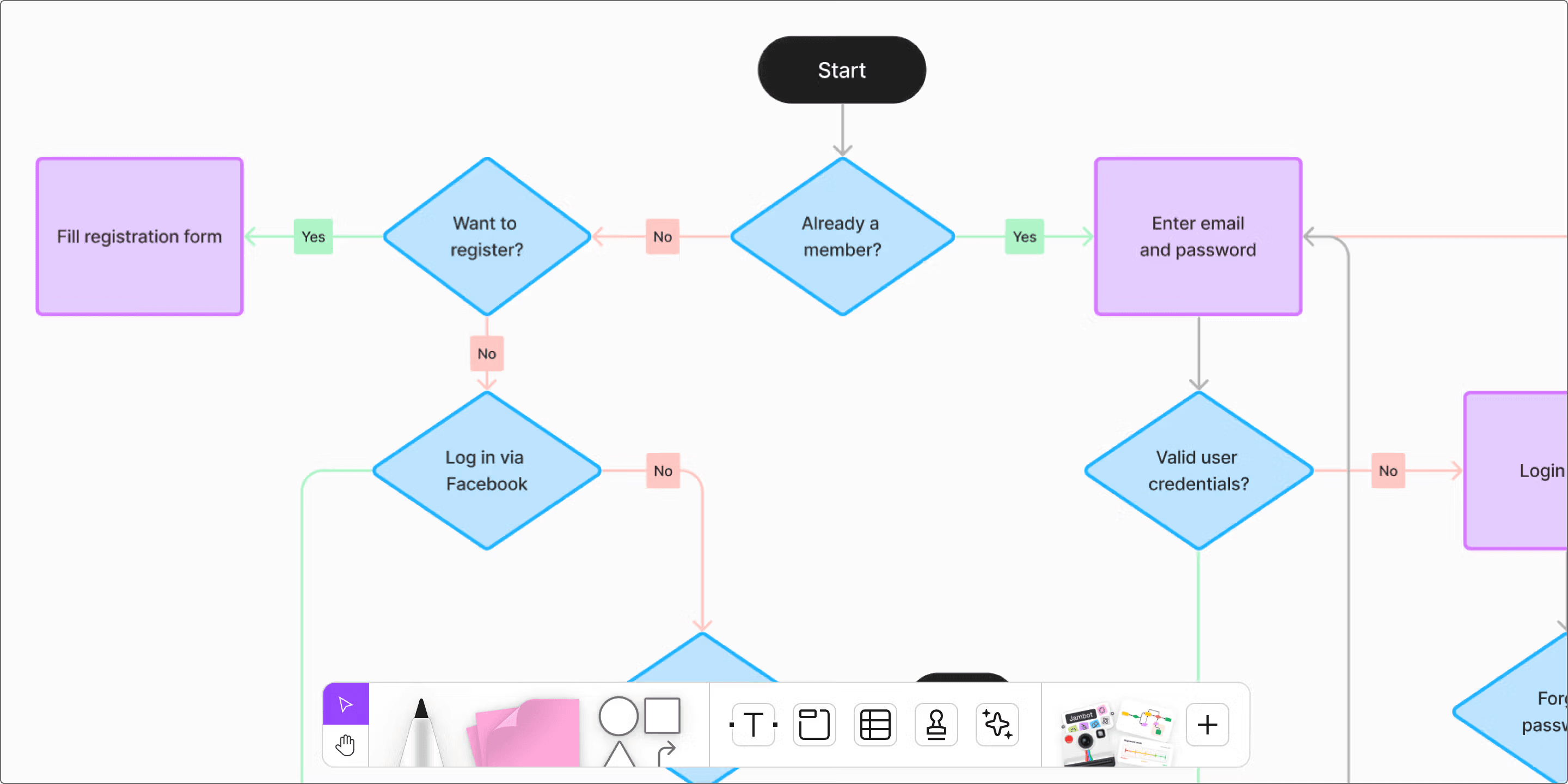
User flows reduce ambiguity. They give designers, developers, and stakeholders a shared understanding of how the product works from a user’s perspective.
Here’s why they’re essential:
✅ They surface UX issues early: you can identify and eliminate friction points before they become costly to fix.
✅ They speed up decision-making: with a clear flow, teams avoid endless debates and misaligned priorities.
✅ They align everyone: from design to dev to business, everyone sees the same user path.
✅ They improve usability: the flow helps you focus on the user’s end goal and remove unnecessary steps.
In short, user flows are both strategic and tactical. They improve product logic while also informing layout, navigation, and feature prioritization.
You don’t need to wait for a design sprint to start mapping user flows. They’re useful at multiple stages of the product lifecycle:
Here’s how we approach user flow design at Acid Tango (clean, structured, and driven by user needs).
Start with a clear understanding of who the user is and what they’re trying to accomplish. If you’re building a booking platform, for example, the goal might be “book a weekend stay” and not just “browse listings.”
Define:
This sets the context for the rest of the flow.
Where does the journey begin? This could be:
The entry point shapes the flow’s structure. Different entry points often require different versions of the same flow.
Now map the key actions users must take. These include:
Focus on meaningful steps, not every single click. Keep it high-level enough for strategic alignment, but detailed enough to design from.
Real users don’t always follow the same path. Your flow should account for:
These are often where the most UX problems occur — and where optimization has the most impact.
What does success look like for the user?
Clearly defining this outcome helps you evaluate whether the flow gets users to where they need to go, with the least amount of effort.
A well-built user flow does more than just connect boxes. Here’s how to make them work:
🔹 Focus on one objective per flow: keep each flow centered on a single user goal. Don’t mix onboarding with checkout in the same diagram.
🔹 Keep it simple and readable: use consistent symbols, clear labels, and minimal distractions. A messy flow is a useless flow.
🔹 Validate with users if possible: theoretical flows are a good start, but real feedback turns them into something useful.
🔹 Test alternate paths: design for edge cases and failures too.
🔹 Share it early: use the flow as a conversation starter with devs, PMs, stakeholders, and users.
Here are a few real-world scenarios where user flows make a major difference:
A confusing signup process is one of the fastest ways to lose new users. A clear onboarding flow ensures users can get started without guesswork.
In e-commerce, every extra step is a drop-off risk. A user flow helps streamline the process, remove unnecessary friction, and increase conversions.
When launching a new feature, mapping a user flow helps ensure users can find, understand, and use it without needing support or documentation.
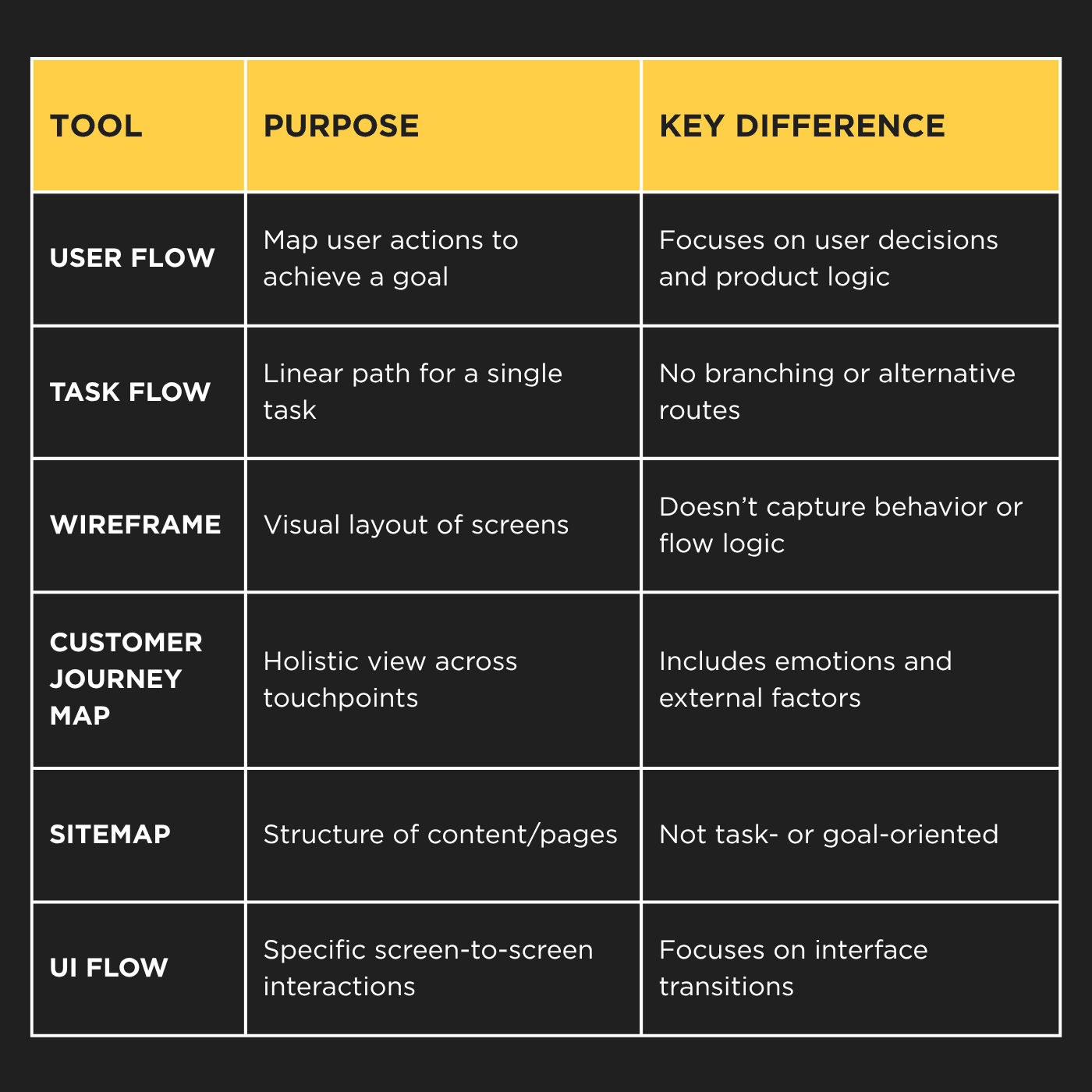
Tools to Build User Flows
There’s no need to reinvent the wheel. Some of the most commonly used tools include:
At Acid Tango, we use Figma and Miro for most flows. They are collaborative, fast, and directly connected to our design system.
So, user flows are a critical part of the UX toolkit. They help teams think through design problems before they become implementation problems. They make the user journey visible, concrete, and easy to test and improve.
If you want to create digital products that are intuitive and efficient, you need user flows.
Here, we use them to keep users at the center of everything we build. And we believe good UX starts with clarity…for your team, and for your users.